
All guides
Create your business account
Register, confirm your email, sign in. About two minutes.
Listing your business on HalSouk is free. You need an email address you can open right now — we send a confirmation link to it before the account works.
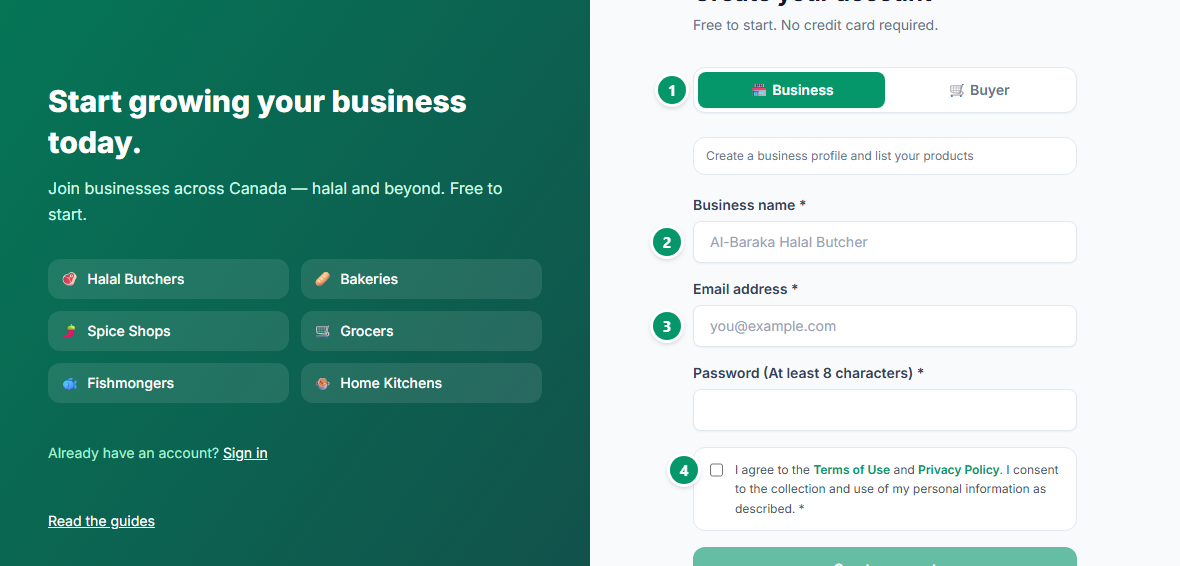
- 1Choose Business. This decides what your account can do, and you cannot switch it yourself later — a buyer account cannot list products.
- 2Enter your business name as customers know it. This is the name that appears in the directory.
- 3Use an email you actually check — the confirmation link goes there, and so do messages from customers.
- 4Accept the Terms of Use and Privacy Policy, then create the account.
Prefer Google? “Continue with Google” skips the confirmation email entirely — but pick Business first, because that choice is what the button carries across.
Open the email we send and click the link, then sign in. You land on your dashboard.